Evaluating a Baby’s First Foods KDP Interior for Your Next Publishing Project
Choosing the right interior template for a self-published book can feel like navigating a maze of options, especially when the topic is as personal and important as introducing solids to a baby. A product like Baby’s First Foods offers a pre-designed, structured interior tailored specifically for parents documenting the weaning journey. This ready-to-use book interior is formatted for Amazon KDP and print-on-demand services, providing a guided journal-style layout rather than a blank notebook or generic log. Understanding exactly what this kind of interior delivers—and where it might fall short—is essential before making a purchase or committing it to your publishing workflow.
What Exactly Is the Baby’s First Foods KDP Interior?
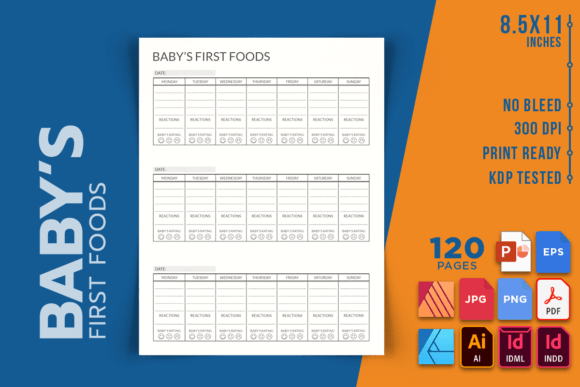
At its core, the Baby’s First Foods KDP Interior is a digital download containing the complete internal pages of a book, minus the cover. It is not a finished paperback you hold in your hands, but rather a set of editable source files and a high-resolution PDF that you can upload directly to Kindle Direct Publishing or send to a local print shop. The package spans 120 pages at 8.5 by 11 inches, a generously sized format that leaves plenty of room for handwriting, notes, and tracking. It is designed at 300 DPI, meeting industry standards for crisp, professional-looking print output. Crucially, the layout includes no bleed, which simplifies printing and reduces the risk of content being trimmed at the edges. The file bundle is notably broad: INDD and IDML for Adobe InDesign users, AI for Illustrator, AFDESIGN and AFPUB for Affinity fans, plus PPTX, EPS, JPEG, PNG, and a print-ready PDF. This cross-software compatibility makes it accessible whether you work on a high-end design suite or prefer more affordable alternatives like Affinity.
Why Someone Would Consider This Interior Over Starting From Scratch
Many creators drawn to this product are navigating the low-content or medium-content publishing space, where books like food journals, milestone trackers, and first-year logs perform consistently well. Designing a 120-page interior from the ground up is a significant time investment, particularly if you need to ensure all visual elements remain consistent, page numbers align, and the final PDF meets KDP’s sometimes finicky specifications. A tested, pre-formatted interior removes much of that technical burden. The inclusion of an editable source file means you can customize fonts, tweak category headings, or adjust the layout to suit a specific niche—perhaps focusing on allergen introduction, baby-led weaning, or a particular cultural cuisine—without rebuilding the entire document. For a first-time self-publisher or a busy parent entrepreneur, this shortcut can turn a daunting task into a manageable afternoon project.
Key Benefits of Using a Pre-Built Food Tracking Interior
Beyond the obvious time savings, there are several practical advantages shaped by the product’s specifications. The large 8.5x11 format is often preferred by parents who want to stick photos, jot down lengthy reactions, or keep the book open on a kitchen counter while spoon-feeding. The no-bleed design means you can print it at home on a standard printer without needing to trim margins or worry about ink smearing at the edges. The 120-page count offers a balance: substantial enough to log several months of food introductions across breakfast, lunch, and dinner, yet not so thick that the printed book becomes unwieldy. The 300 DPI resolution ensures that any decorative elements, icons, or borders within the interior remain sharp. And because the files come in so many formats, you are not locked into a single piece of expensive software; you can even edit the files using the free trial of Affinity or an older version of PowerPoint if necessary.
A Closer Look at Customization Potential
Editable source files are the standout feature for anyone who has ever struggled with a locked PDF. You can add a personalized introduction page, adjust the food tracking prompts, insert allergy warning checkboxes, or even rebrand the entire interior with your own color scheme. This flexibility means the same core product can be adapted across multiple market segments—a high-contrast version for baby-led weaning, a minimalist version for modern parents, or a playful illustrated version for a different demographic. The tradeoff, of course, is that meaningful customization requires at least basic familiarity with design software. Dragging elements around in Affinity Publisher or InDesign is not difficult, but it does assume a learning curve that a drag-and-drop web app might not demand.
Tradeoffs and Considerations Before You Purchase
No product is a perfect fit for every scenario, and it's important to examine where this interior might introduce friction. The first and most obvious limitation is that this is an interior only. You must create your own cover—this includes both the front and back cover, as well as the spine—and format it correctly for KDP. While Amazon provides a cover calculator and templates, this remains an additional step that requires its own design effort. A mismatched or amateur-looking cover can sink a book’s prospects, so budget for cover design time or a separate template purchase if needed. Second, the 8.5 by 11 inch size, while popular for journals, may not appeal to every buyer demographic. Some parents prefer a more compact 6x9 format that fits neatly into a diaper bag or stroller pocket. A larger format interior might feel less portable and could be perceived as bulky by a segment of the market. Third, the no-bleed design is practical but can look less polished than a full-bleed, edge-to-edge color layout if the graphic design relies heavily on background imagery extending to the page edge. A clean, border-and-prompt layout suits no-bleed perfectly; a lush, photographic design might feel constrained.
Situations Where This Interior Shines Brightest
This product is most aligned with the goals of a KDP publisher who wants to release a functional, attractive baby food journal with minimal technical hurdles. It shines when you value format flexibility over immediate simplicity—the array of file types suggests the creator anticipated a diverse user base with varying software access. If you are building a brand around parenting journals and plan to release multiple related interiors (perhaps a first-year milestone book or a breastfeeding log), the editable source file becomes a valuable asset you can return to again and again, maintaining visual consistency across your catalog. It also fits beautifully for a print-at-home scenario; a grandparent or family member might purchase the downloadable interior, print the PDF at a local shop, and gift it alongside a set of baby spoons. The immediacy of a digital download combined with local printing bypasses Amazon shipping times and costs.
When an Alternative Might Be the Wiser Choice
Despite its strengths, there are clear situations where investigating other options makes sense. If you have never used any of the supported design programs and feel genuine anxiety about even opening an INDD or AFDESIGN file, a simpler, plug-and-play Canva template might serve you better—though you will need to verify Canva’s licensing terms for KDP use. If your target market overwhelmingly prefers a small, handbag-friendly trim size, an 8.5x11 interior will not magically shrink itself, and scaling a layout designed for a large canvas down to 6x9 often results in awkwardly small text and cramped margins. If you anticipate wanting heavily illustrated, full-color backgrounds that bleed off the page, a no-bleed interior will not deliver the visual drama you might want. And if your personal workflow is entirely Google-docs based with no access to desktop publishing software, the file types offered here, while generous to designers, may simply be incompatible with your tools. In these cases, exploring Canva-compatible templates, hiring a designer for a one-off custom interior, or purchasing a smaller-format, full-bleed alternative would be a more practical route.
Practical Decision-Making Insights for Prospective Buyers
Before clicking purchase, it can help to walk through a brief self-assessment. Consider the following points:
- Your design comfort level: Do you know how to navigate layers, text frames, and master pages in at least one of the supported programs? If yes, the editable source files unlock tremendous value. If no, you might realistically only use the unedited PDF, which limits your ability to brand the book uniquely.
- Your niche’s size preference: Look at the top-selling baby food journals in your target category. Are they overwhelmingly 8.5x11, or are smaller formats dominating? Let market data guide your decision rather than personal preference alone.
- Your cover design plan: Since the cover is not included, outline how you will source or create it. If you already have cover design skills and a template, this is a non-issue. If you don’t, factor in the time or cost of acquiring a matching cover.
- Your printing intent: If this is destined purely for KDP, the PDF and standard trim size work seamlessly. If you plan to offer it as a printable on platforms like Etsy, the editable source file becomes even more critical for adding your shop branding and instructions.
- The depth of content you need: 120 pages is a middle-ground length. For a baby’s full first year of eating (roughly 180–365 days of meals), 120 pages may require a condensed daily entry or a weekly summary format. Ensure the interior’s page allocation matches the tracking granularity you want to offer buyers.
Understanding What “Tested for KDP” Really Means
The product description notes it is formatted and tested for KDP, which speaks to a significant practical headache many first-time publishers encounter. KDP can reject files for obscure reasons: fonts not embedded, images below 200 DPI, margins that stray too close to the trim edge, page counts that violate minimums. A tested interior generally means the PDF has gone through KDP’s preflight checks successfully, with proper margins, embedded fonts if required, and compliant resolution. This does not guarantee your upload will be accepted without issue—cover formatting, metadata, and pricing settings all play a role—but it greatly reduces the likelihood of a technical rejection rooted in the interior file itself. For peace of mind, check that the downloaded PDF passes KDP’s online previewer before you publish; the product’s claims provide a strong starting point, but a final local verification is always wise.
Final Thoughts on Alignment With Your Publishing Goals
The Baby’s First Foods KDP Interior sits at a practical intersection of convenience, quality, and creative control. It is neither a one-click passive income solution nor an overly complex design labyrinth. For a self-publisher who already possesses or is willing to learn basic desktop publishing skills, it offers a substantial head start—a professionally dimensioned, resolution-appropriate, structurally sound book foundation that can be shaped for multiple niches within the parenting market. For someone seeking absolute turnkey simplicity with no software learning curve, the editable source file may sit unused, making the purchase less justifiable compared to a purely ready-to-upload PDF with matching cover included. By honestly assessing your skills, your audience’s format expectations, and the effort you can realistically invest in customization, you can determine whether this particular interior moves your publishing project forward or whether your energy is better directed toward a different approach entirely.